

Ordering freight equipment based on guesswork is one of the most expensive habits in logistics. Whether shipping via ocean containers, trailers, or air freight ULDs, underutilizing available space directly inflates your transport cost per unit. Conversely, miscalculating cargo volume often leads to last-minute equipment upgrades or left-behind freight at the warehouse.
To solve this, export coordinators and cold chain planners rely on 3D Cargo Load Calculators to accurately visualize, calculate, and share optimized container packing layouts before a single pallet moves.
See this short (0:29) introvideo
Key Operational Challenges Solved by 3D Load Planning
1. Eliminating “Air Freight” in Ocean Containers
Without precise 3D modeling, cargo planners frequently default to conservative estimates, leading to ordering a 40ft High Cube container when a standard 40ft or 20ft would have sufficed. Visualizing cargo packing density ensures every cubic meter is utilized.
2. Temperature-Sensitive & Cold Chain Optimization
In cold chain logistics, packing is not just about fitting boxes—it is about preserving product quality. Proper spatial arrangement allows for optimal airflow, minimizing temperature fluctuations for sensitive pharmaceuticals or perishable foodstuffs while maximizing dry ice and thermal packaging space.
3. Standardized Equipment & Custom Cargo Rules
Different freight shipments call for distinct packaging parameters:
- Pallet Types: Quickly select standard sizes such as EUR wooden pallets (EPAL 1), EUR plastic pallets, ½ EUR pallets (EPAL 6), US wooden pallets (EPAL 3), or define custom user dimensions.
- Orientation & Stacking Rules: Set strict rules for box rotation, floor-to-top vs. right-to-left loading directions, and stacking limits to protect fragile freight.
How to Streamline Your 3D Cargo Workflow (Step-by-Step)

Step 1: Rapid Data Import via Excel – or add by tyoing

There are 3 ways to add your cargo – you can add box or cylindric cargo or use our [Import data] button. Instead of entering box dimensions one by one, upload your cargo manifests in bulk. By copying and pasting data directly into the system from Excel templates, logistics teams can prepare complex multi-SKU container calculations in minutes.

Or upload directly

Step 2: Selecting Equipment & Space Shrinkage Settings
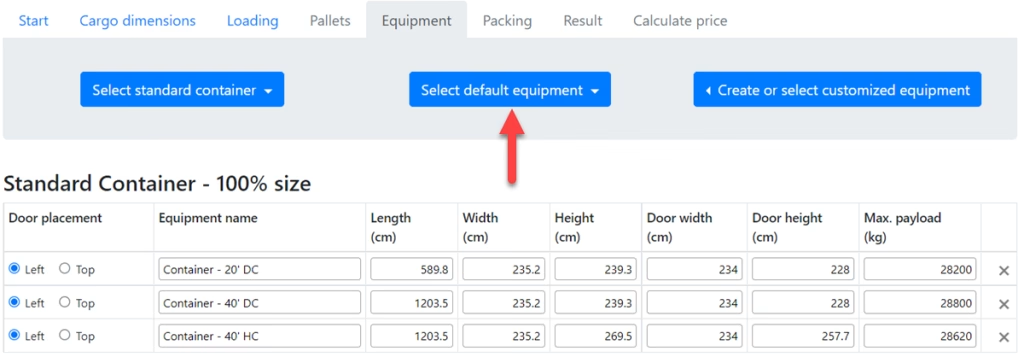
Choose from default container/truck sizes or create custom equipment dimensions. Advanced calculators allow you to apply space margin reductions (e.g., utilizing 95% of space capacity) to account for container wall ridges, door clearances, and packaging bulges.


On the packing page you got 4 options: Standard, Choose the loading order, Turn rotation on/off, Choose if stacking is allowed

You can also change the loading direction between right to left or for floor to top.

Step 3: Interactive 3D Model & Shareable Packing Reports
Once the calculation is completed:
- Inspect the 3D Model: View the exact loading arrangement in an interactive 3D viewer.
- Generate PDF Packing Reports: Provide warehouse teams with clear, step-by-step packing instructions to avoid manual loading errors.
- Share URL Links: Send read-only calculation URLs directly to clients, suppliers, or freight forwarders for instant verification.

You can also open a 3D model of your calculation by clicking on the button [Show 3D equipment model].

View the result in live 3D
If you would like to be able to share your calculation with colleagues or clients, click on the [Share loading with URL link] button. Just set the permissions page by page or use the set all option and then just click on copy and paste into a message.

How 3D Load Planning Fits Into Your Broader Logistics Hub
Space optimization is just one piece of an efficient supply chain. To see how 3D load planning connects with multi-carrier tracking, demurrage management, and transport CO2 calculations, read our comprehensive guide:
Try the Pier2Pier.com Logistics Platform
Stop guessing your container capacity. Test your cargo dimensions and streamline your load planning today.